How to Remove Wind Noise From Video Free (Phone, Desktop and Online)
Phone wind settings, a high-pass filter and free AI allowances: clearing wind from a clip, and when distortion means it can't be fixed.
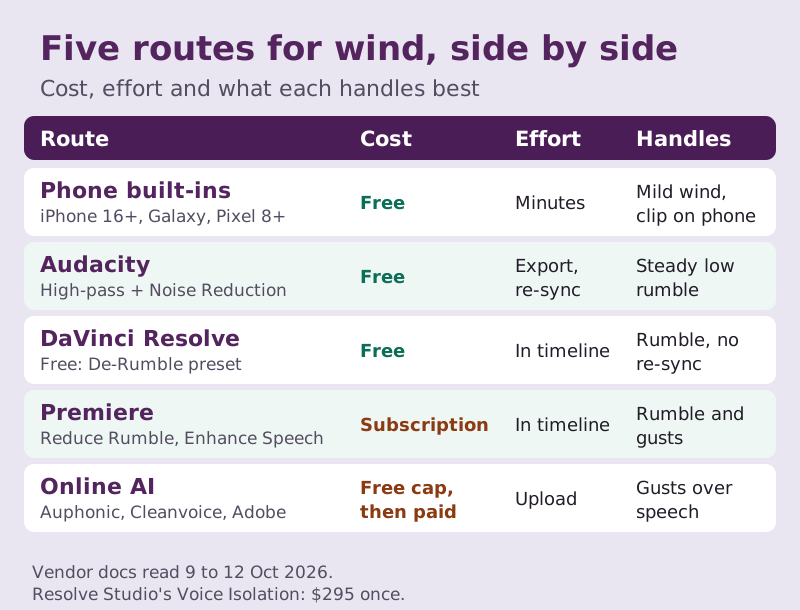
Yes, you can remove wind noise from video free in most cases, provided the gusts didn't overload the microphone. Begin on the phone that shot the clip: iPhone 16 and later cut wind while recording, Samsung's Audio Eraser has its own Wind slider, and Pixels from the 8 onward include Audio Magic Eraser. On a computer, a high-pass filter in Audacity or the De-Rumble preset in the free DaVinci Resolve clears the low rumble at no cost, and AI cleanup services with a free allowance (Auphonic, Adobe's Enhance Speech, Cleanvoice) deal with the gusty bursts a filter can't reach.
Like everything on CleanTake, this is about a clip you've already shot. I'll explain why wind behaves so differently from other noise, because that decides which tool works, then go route by route: phone, free desktop software, the two big editors, and the online AI tools. Each step was checked against the vendor's own documentation between 9 and 12 October 2026. If the wind distorted the sound, no tool fully brings that back, and the first section shows you how to tell.
Why wind noise is different (and when it can't be fixed)
Most unwanted sound reaches a microphone the same way your voice does: it travels through the air from somewhere else. A fan, a road, a crowd. Wind isn't like that. It is moving air striking the microphone itself, and the turbulence it whips up right at the capsule is picked up as a loud, uneven roar. Because it happens a few millimetres from the mic instead of a few metres away, a single gust can outweigh the person speaking, even on a day that didn't feel particularly blustery.
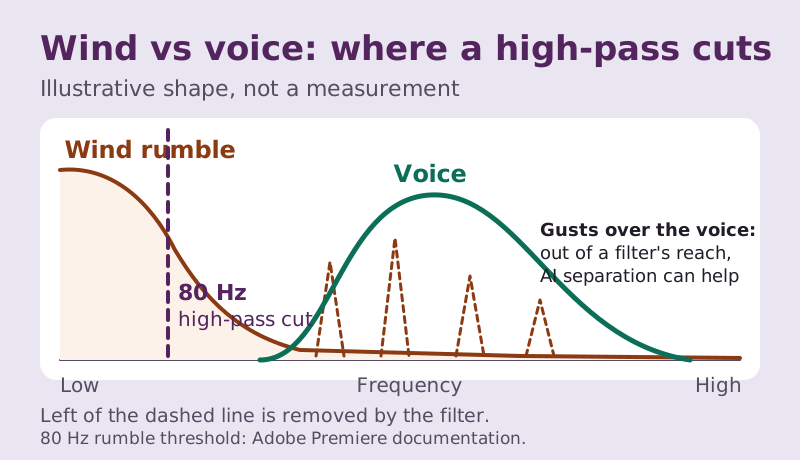
Two traits follow, and they decide which fixes work. Most of the energy sits low, in the boomy region underneath the voice: Adobe's documentation for Premiere describes rumble as noise below roughly 80 Hz, and that is the zone a high-pass filter can clear while leaving speech largely intact. And wind arrives in bursts, flaring and dropping from one second to the next. A tool that learns a single noise profile and subtracts it everywhere will scrub the calm moments too hard and the gusts not hard enough.
The third trait is the one that ends some rescues before they begin. A strong gust can drive the mic or the phone's input past its limit, and the waveform gets sliced flat at the top. You hear that as crackle or a hard, papery distortion laid over the voice, not as rumble. Filtering removes the rumble and leaves the distortion behind; AI tools can only estimate what the voice beneath it sounded like. So zoom in on the waveform at the worst gust before you start. If the peaks look chopped off, aim for better rather than clean. In Audacity, the Clip Fix effect under Noise Removal and Repair can soften mild clipping as a first pass.
How to remove wind noise from video on your phone first
If the clip is still on the phone that recorded it, try the built-in tools before exporting anything. They are free, they process the video directly so nothing can drift out of sync, and each one saves a copy rather than overwriting the original.
iPhone
On iPhone 16 or later, Apple says wind noise is reduced automatically while you record video in Spatial Audio or Stereo. The switch, Wind Noise Reduction, sits in Settings under Camera and then Record Sound, so leave it on for future clips. For a clip already shot in Spatial Audio, open it in Photos, tap Edit, then Audio Mix. The In-Frame mix turns down sounds from sources that aren't visible in the picture, and the Studio mix reduces background sound and reverb, with a slider to set the strength. Apple doesn't name wind as a target for Audio Mix, so treat it as worth a listen, not a guaranteed fix. Older iPhones don't offer Audio Mix; our iPhone recordings guide covers what they can do.
Samsung Galaxy
Samsung's Audio Eraser is the most direct free route, because wind is one of its named categories. In the Gallery video editor it splits the soundtrack into types (Samsung lists Voices, Music, Wind, Nature, Crowd and Noise, plus Auto), and you lower Wind while leaving Voices alone. Tap Apply edits and then Save copy, and the original clip stays as it was. It needs a Samsung account and runs on select Galaxy phones and tablets. Our Android recordings guide answers the model and app questions.
Google Pixel
Pixel 8 and later phones, though not Pixel tablets, have Audio Magic Eraser in Google Photos. Open the video, tap Edit, then Audio, and either choose Auto or tap a sound and pull its slider down. Google notes that the sound options depend on the video and aren't all offered at once, so the list changes from clip to clip. Save copy keeps the original.
One habit applies to all three. Check the result on headphones before you save. Phone speakers barely reproduce low frequencies, so rumble that seems gone on the speaker can still boom on a laptop or a TV.
Free desktop route: Audacity high-pass plus noise reduction
Audacity is free, open source and runs on Windows, macOS and Linux, and it handles the classic two-step wind fix well. It edits audio, not video, so start by exporting the clip's soundtrack as a WAV at its full length. Our article on removing noise from video explains how to bring the cleaned track back without drift.
Step one is the high-pass filter, which removes everything below a frequency you set: Effect, then EQ and Filters, then High-Pass Filter. Watch the default here. Audacity opens it at 1000 Hz with a gentle 6 dB per octave slope, a setting that would hollow out most voices. Bring the frequency down to around 80 Hz, preview, and raise it in small steps only while rumble remains, stopping as soon as voices start to sound thin. The Roll-off menu offers 6, 12, 24, 36 and 48 dB per octave. A steeper slope removes more of what lies below the cutoff while leaving more of the voice above it alone, so it's often the better lever than a higher frequency.
Step two is for a steady breeze or hiss that survives the filter. Open Noise Reduction from the Effect menu's Noise Removal and Repair group, highlight a stretch where you hear only wind, and click Get Noise Profile; then select everything and run the effect again to apply it. Audacity 4 defaults to 6 dB of reduction on a scale that runs to 48. Push it much further on wind and the quiet passages go watery. Gusts are better left to an AI tool than chased with more reduction. Our Audacity page covers the profile settings in more depth.
Premiere and DaVinci Resolve
Premiere
Adobe Premiere, the editor formerly called Premiere Pro, puts two relevant controls in the Essential Sound panel once you tag the clip as Dialogue. Under Repair, Reduce Rumble targets the very low band that Adobe defines as below 80 Hz, which is exactly where steady wind rumble lives, and Reduce Noise deals with the broadband hiss riding along with it. For gusty wind, try Enhance Speech in the same panel, Adobe's AI dialogue cleanup; its Mix Amount slider blends some of the original back so the voice doesn't sound pasted onto silence. Premiere is a paid subscription, so this is the route if you already edit there; our Premiere guide walks through the panel.
DaVinci Resolve
The free version of DaVinci Resolve 21 is the best no-cost video editor for wind, because the fix happens on the timeline and sync never comes into play. On the Fairlight page, add Noise Reduction from the Fairlight FX list to the clip or track. It ships with De-Hiss, De-Rumble and a combined De-Rumble and Hiss preset, and it can detect the noise automatically or learn it from a selection; start with De-Rumble. Voice Isolation, which copes better with gusts, is reserved for DaVinci Resolve Studio, which costs $295 once (price read 9 October 2026). The Resolve guide covers the free noise tools step by step.
Online AI tools: what they do with wind
Gusts are where AI separation earns its keep. Rather than cutting a frequency band or subtracting a fixed profile, these tools model what speech sounds like and keep that, so a burst that lands on top of a word can drop without taking the word with it. They also differ in whether they accept video at all, which matters more for this job than small differences in quality.
Auphonic is the most wind-aware of the three. Its documentation lists outdoor recordings with wind or traffic as a job for the Dynamic Denoiser, which keeps speech and music and removes everything else, and it adds an adaptive high-pass filter that drops unneeded low frequencies segment by segment. It accepts video files, and a free account processes 2 hours a month. If you choose Speech Isolation instead, music goes too, so keep that for clips without a soundtrack you care about.
Enhance Speech from Adobe Podcast costs nothing for up to 1 hour of audio daily, in files of up to 30 minutes and 500 MB, but the free tier is audio only, so you extract the soundtrack first and re-sync afterwards. Video upload and a strength control are Premium features, with a 30-day trial. Adobe's aim is a voice that sounds recorded in a professional podcasting studio, and on wind that can overshoot: a dry, close-miked voice over footage of a windy beach looks and sounds odd. Our Enhance Speech page covers the settings.
Cleanvoice says on its own site that its audio and video editor removes wind noise, and new accounts get 30 minutes of free credit, a one-time allowance rather than a monthly one. Descript's free tier includes 60 media minutes a month, though Studio Sound, its cleanup tool, is marked limited there. Our page on online tools compares the free allowances side by side.
Past the free allowances, Auphonic bills by processed hours. The entry recurring tier, S, includes 9 hours a month, recurring hours reset monthly without rolling over, and yearly billing saves 20%. Credits bought as one-off packs don't expire, handy if windy shoots are occasional. Prices for Auphonic, Cleanvoice and Adobe Podcast Premium didn't render reliably when we read them from the US, so I won't quote figures here; check each vendor's pricing page.
Next time: windscreens and settings
Every fix above is a compromise, so the cheapest wind removal is still the kind that happens before you press record. A foam cover helps in a light breeze; a furry outdoor windscreen, the kind that looks like a small animal, does far more because it slows the air before it reaches the capsule. Clip-on lavalier mics come with small foam or fur covers for the same reason, and wearing one under a collar shelters it further, though you then have to watch for clothing rustle.
With a phone, the cheapest windscreen is your own body. Stand with your back to the wind so the phone's microphones sit in your shadow, and keep fingers clear of the mic openings. On iPhone 16 or later, check that Wind Noise Reduction is still on. And record a few seconds of the wind alone before or after the talking: a profile-based tool like Audacity's Noise Reduction learns from exactly that stretch, and it costs you nothing to capture.
Edge cases
The wind is louder than the voice
When gusts dominate, every tool has little voice to hold on to. Try an AI tool first (Auphonic's Dynamic Denoiser, Premiere's Enhance Speech or Samsung's Wind slider), then cover the worst seconds with captions or B-roll rather than pushing the strength to the point where the voice warbles.
There's music or ambience you want to keep
Speech Isolation modes take music out along with the noise, and other voice-only cleanup can do the same. Auphonic's Dynamic Denoiser keeps both speech and music, and Samsung's Audio Eraser lets you lower Wind while leaving Music and Nature where they are. If you're adding a music bed later, clean the dialogue first and lay the music on afterwards.
The clip is longer than a free cap
Adobe's free tier stops at 30 minutes per file and an hour a day, so split a long extracted track into chunks at natural pauses and process them on different days, or use Auphonic's monthly 2 hours on one pass. Keep the chunk boundaries clean so re-syncing stays simple.
You also have a second recording
If a lav or a separate recorder ran alongside the camera, compare both before cleaning anything. A sheltered lav track with light rumble beats a camera track buried in gusts, and starting from the better source means less processing and fewer artefacts.
Wind noise in video: frequently asked questions
How do I remove wind noise from video for free?
Use your phone's built-in tool first (Audio Eraser's Wind slider on Galaxy, Audio Magic Eraser on Pixel 8 and later, Audio Mix on iPhone 16 and later). On a computer, apply a high-pass filter around 80 Hz in Audacity or the De-Rumble preset in DaVinci Resolve's free Noise Reduction. For gusts over speech, use a free allowance on Auphonic, Adobe Enhance Speech or Cleanvoice.
Is there an app to remove wind noise from video?
Yes. Samsung's Gallery editor has Audio Eraser with a dedicated Wind category, Google Photos on Pixel 8 and later has Audio Magic Eraser, and iPhone 16 and later can rebalance Spatial Audio clips with Audio Mix. All three are free and save a copy. Among web tools, Auphonic and Cleanvoice accept video files directly.
Can AI remove wind noise completely?
It removes most rumble and many gusts, but not distortion. If the wind overloaded the microphone, the clipped sound is gone, and the AI can only approximate what was underneath. AI wind removers also struggle when gusts are louder than the voice, so expect a big improvement on moderate wind and a partial one on a gale.
What frequency should a high-pass filter use for wind?
Start around 80 Hz, the boundary Adobe uses to describe rumble, and raise it slowly while listening. Stop when voices start to sound thin. In Audacity, a steeper roll-off such as 24 dB per octave often helps more than a higher cutoff, and never accept its 1000 Hz default for speech.
Does Adobe Podcast Enhance work on video?
Only on Premium. The free tier accepts audio only, so export the soundtrack as a WAV, enhance it, and line it back up under the picture. Premium adds MP4 and MOV upload, a strength slider and files up to 2 hours, with a 30-day trial.